Yesterday I got the message that now was the time to move from Windows Live Spaces to WordPress. If you are wondering why, here are some reports from the media:
- http://mashable.com/2010/09/27/windows-live-spaces-wordpress/
- http://www.huffingtonpost.com/2010/09/27/microsoft-dumps-windows-l_n_741023.html
In the News:
“Microsoft has since shifted its strategy, providing tools and services that mesh better with competitors’ programs. For example, people can use the Windows Live Photo Gallery program to publish pictures to Yahoo Inc.’s Flickr site, or connect feeds from social networks Facebook and LinkedIn with Messenger accounts and Windows Live profile pages.
In a blog post, Microsoft said giving its customers access to WordPress.com was a better move than continuing to invest in its own service. That may be because Windows Live Spaces gets a fraction of the traffic its competitors do, at least in the U.S.” ~ Huffington Post
After talking to some people from my friends list on Facebook, I thought I’d document my experience.
So it Begins:
I chose to backup my old Windows Live Spaces data to my hard drive. The dialog started saying the process was going and it showed an activity bar. But at one third of the way complete, the activity bar never changed, even though I went down stairs to eat dinner during the process. So I checked my hard drive and the backup was right where I put it. So I killed the window. Mind you, I have a very fast IP service using FiOS, so this could take a lot longer for those on slower access points.
So I selected move my blog to WordPress and got a screen that said the process was started and that my near 3000 topics, and 1000s of pictures would be moved over to the new site. I got lost every once in a while throughout the process and kept going back to the WordPress FAQ and documentation to figure what was wrong. This is NOT a process for the weak at heart types. And I can’t even imagine my Mom doing it without my help. (Yes, I get to move hers this weekend on a slower line. I am not looking forward to that.)
Note, I just found out I might have been able to make use of the WordPress.tv for how-to videos. I haven’t played with that yet.

Since I was already a WordPress member, there were some eccentricities to parse, but eventually I was given a new password to match my 25 alpha-numeric User Name. I was told that I could not change this user name and it was one that I would never be able to memorize. But somewhere in the process of customizing my avatar I was routed to Gravatar which allowed me to change my User Name to one that I could use when signing in on WordPress.I was also allowed to close the IE8 window and doing other things. I was to get an email when the process was completed. Well in less than an hour, IIRC, my site was moved and I went to log into WordPress.
 My site was set to default template which allowed me to add back in my header art from the Spaces world. It isn’t quite as good as it was on Spaces, but supposedly I could hack the CSS and customize more. I’m not inclined to do that.
Here are some questions my friends have asked me:
1. Do I get to keep my Windows Live email account? YES
2. Do we get to keep our site name? YES, you get a new URL but the site name is totally up to you.
3. Is there a problem if I don’t use IE8? Not that I know of.
4. Where is this FAQ and Documentation you speak of? Start here: http://en.blog.wordpress.com/2010/09/27/welcome-windows-live-spaces-bloggers/
Windows Live Writer
So after another two hours of playing with the site layout and customizing the look and feel of my new blog property, I’m somewhat optimistic that this move will be a good thing. There are some data size limitations that are discussed here: http://en.support.wordpress.com/space-upgrade/. So now I want to do my first post, using Windows Live Writer. I found the generic editor to be somewhat limiting and missing much of the features I’ve come to luv with the free Windows Live Writer.
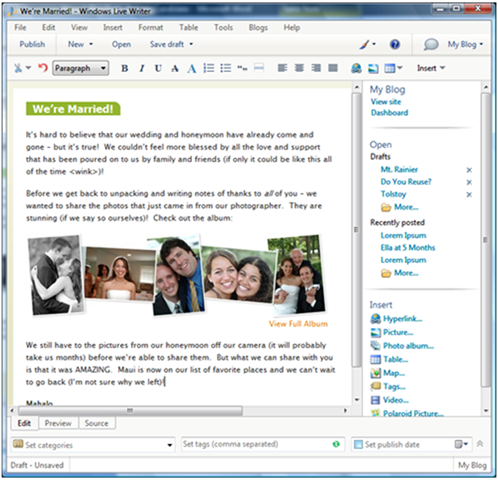
The first thing I did was download an updated copy of the program just in case there were changes made because of the move to WordPress. Then used the TOOLS menu item –> ACCOUNTS to remove the old blog that was on the Windows Live property. Then I went to BLOGS –> ADD ACCOUNT to add the new WordPress location in. And here you see the result of that process. Posting was a breeze and I’m guessing at least twice as fast as with the old site. I came back into Live Writer and added this, corrected some spellings and added the bold headings, hit PUBLISH again and very quickly my post was updated.