The Frankentenor by JBT

More tales from the Woodwind Forum, this one from John and touching my luv of vintage sax patinas and custom engraving:

Jason Dumars is the one who deserves the credit. He is a gifted artist and craftsman of the highest caliber, and a real nice guy to boot.

Another quick story. I decided to sell an old Conn tenor on SOTW that I pieced together from two junker horns picked up in pawnshops. I took the best parts from each and made a playable sax that I named "Frankentenor". The lacquer had come off in many spots where the brass turned reddish brown and it was "butt ugly", but it played really well. To my surprise Jason Dumars jumped right on it and said he wanted to buy it. He and I worked out a deal where the tenor would be a down payment for a future engraving job (my SBA).

image

I though no more about it until in a thread on SOTW entitled "The most beautiful saxophone in the world", I saw a post contributed by Jason Dumars in which I recognized my "ugly duckling" Conn "Frankentenor" which he had transformed into a work of art. ~ JBTsax

Posted in Saxophone | Leave a comment

Tag Clouds and Wordle.net

Every once in a while I like to play with tag cloud generators. A tag cloud or word cloud is a visual depiction of user-generated tags, or simply the word content of a site, typically used to describe the content of web sites. Tags are usually single words and are normally listed alphabetically, and the importance of a tag is shown with font size or color.

So I looked up the Wordle.net sight and took a snapshot of my site as of today. The orientation and color palate is adjustable but in this instance I went with the defaults. I’m hoping the old in this cloud relates to vintage instruments and not old people. ;O)

image

This other Wordle snapshot was taken of my blog in Dec 2008. There is a lot of commonality in these two clouds. I’m thinking of using this to create band fronts for the Microsoft Jazz Band. I’ve actually generated the cloud but now I have to figure out how to blow it up 4 times larger. Oh, did I mention the concert is this Thursday? I’ve been working on the band stand fronts for about a year now. I just haven’t stumbled upon a solution that I like… so far.

Posted in Everyday Science | Leave a comment

The Dissonance Redux ~ 2010

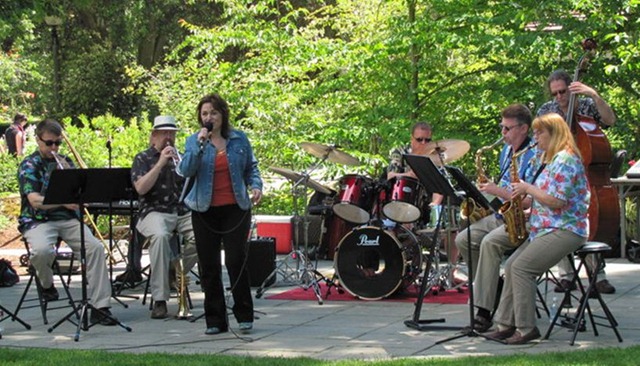
The Dissonance, a jazz xTet,  got together again at the Ballard Locks for a reunion gig. All my favorite peeps were there and we reprised the set list from our last gig. There were some recordings and pictures taken and this is what I have so far from the event. (Thanks go to Christy Anderson.) There were some really good moments in the set where things just clicked. You live for moments like that and hope someone notices.

Dissoance2010suzyMe  GarySuzMe  HarryGary

TheBandBL2010

It turned out be a really nice day and there was a decent sized audience even though the weather earlier that morning was very cloudy and cold. There is a request to have us perform for a paid event, but I’m not sure if I can get the group together for that this Fall. We’ll see.

Posted in Jazz | Leave a comment

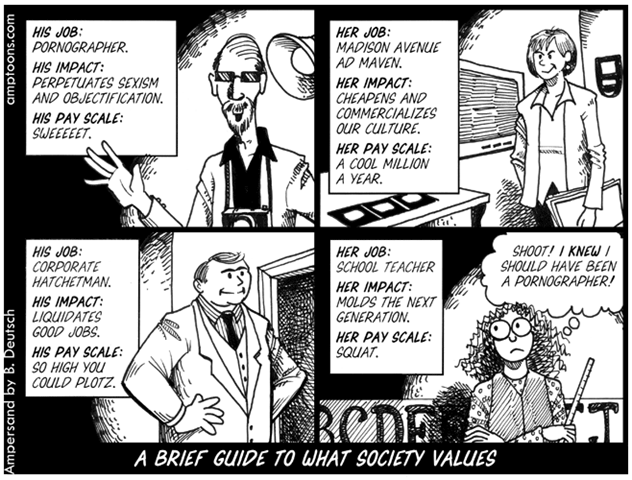
Barry Deutsch ~ Economic Cartoons

image

By my favorite new cartoonist, Barry Deutsch.

Posted in Humor | Leave a comment

Email Faux Pas and other Tips and Tricks

image If you send me an email with the subject line of “Hi” and your email is in my junk folder, I won’t read it. Would you? Nine out of nine times that email is really junk. Junk email is becoming a real problem for most people who use the Internet as their primary email service. Title your emails so that they sound interesting enough to read.

I also recommend that you use the ‘white list’ method of sorting through junk. (Photo by Louis Trocciola)

Microsoft Hotmail: Exclusive

For example, in Microsoft’s Hotmail you have the option of choosing Exclusive for your junk e-mail filter; only messages from email addresses on your Contacts or Allowed senders lists appear in your Inbox. Messages from senders not on those lists are automatically sent to the Junk folder.

You should occasionally check your Junk folder to make sure that good messages are not sent to there by mistake. If you notice a message that was inadvertently put in the Junk folder, open the Junk folder, select the message, and then, on the Action bar, click Not junk. But by using this method of filtering your Inbox, you can greatly reduce the junk that you see everyday.

Manage your Contacts

To help you keep your contact list (Your contact list is where you keep information about people who are in your network on Windows Live or on your Windows Live Messenger list, such as their name, e-mail address, and phone number. When people share their details with you, you automatically get updated contact information from them. ) organized, you can import your contacts from other e-mail accounts, and merge or clean up duplicate contacts. When you create or import a name or e-mail address that contains the same or similar information as an existing contact, Windows Live prompts you to merge the contact with an existing contact or to add it as a new contact.

To use your contact list in other programs, you can export your contacts to a file that can be edited in a spreadsheet or a program that does mail-merges, such as Microsoft Office Word. You can then open the file in any text editor or word-processing program, or import it into a spreadsheet or into your e-mail program.

Merge duplicate contacts:

  1. Sign in to the Windows Live Hotmail website with your Windows Live ID ( The user name and password that you use to sign in to any Windows Live, MSN, or Office Live sites and services. If you have a Passport Network, Hotmail, or Messenger account, you can use it as your Windows Live ID. ) , and then click People.
  2. Select the check boxes next to the contacts that are for the same person.
  3. At the top of the page, click Manage.
  4. Click Merge.
  5. Check and, if necessary, edit the contact details.
  6. Click Save.

Clean up duplicate contacts: You may have people more than once in your contact list with different contact information. To tidy them up, do the following:

  1. Sign in to the Windows Live Hotmail website with your Windows Live ID ( The user name and password that you use to sign in to any Windows Live, MSN, or Office Live sites and services. If you have a Passport Network, Hotmail, or Messenger account, you can use it as your Windows Live ID. ) , and then click People.
  2. At the top of the page, click Manage.
  3. Click Clean up contacts.
  4. Click Clean up duplicate contacts.
  5. If you have duplicate contacts, they are listed with the number of matches found. Contacts that contain the same information are identified as Exact matches. Contacts that contain similar information, such as the same e-mail address or the same name are identified as Similar matches.
  6. From the list, select a name.
  7. To delete a duplicate contact, check the box next to it, and then click Delete.

    –or–

    To merge the information of duplicate contacts, click Merge.

  8. Click Save.
  9. Repeat these steps for each name on the list.

Import contacts from another e-mail program or service:

  1. Before you can import your contacts into Windows Live, you must first export them to a file from your other e-mail program or service. See the Help documentation for your other e-mail program or service for more information.
  2. Sign in to the Windows Live Hotmail website with your Windows Live ID ( The user name and password that you use to sign in to any Windows Live, MSN, or Office Live sites and services. If you have a Passport Network, Hotmail, or Messenger account, you can use it as your Windows Live ID. ) , and then click People.
  3. At the top of the page, click Manage.
  4. Click Import.
  5. Under Option 2: Import from a file, select the e-mail program or service that you want to import your contacts from.
  6. To find the file that you want to import, click Browse.
  7. Locate the file, and then click Open.
  8. Click Import contacts.

Export contacts to a CSV file:

  1. Sign in to the Windows Live Hotmail website with your Windows Live ID ( The user name and password that you use to sign in to any Windows Live, MSN, or Office Live sites and services. If you have a Passport Network, Hotmail, or Messenger account, you can use it as your Windows Live ID. ) , and then click People.
  2. At the top of the page, click Manage.
  3. Click Export, and then click Export contacts.
  4. Click Save.
  5. Select the location where you want to save the file on your computer, and then click Save.
  6. Your contacts are downloaded into a Comma Separated Values (CSV) file, in which the comma character (,) separates each field of text. To edit or use them, import the saved file into a spreadsheet, e-mail program, or word processing document.

I hope this short primer, taken from the Windows Live Hotmail help files, can move some of my friends from rookie to email zen master status. Well, maybe just to power user status.  ;O)

Posted in Technology | 2 Comments

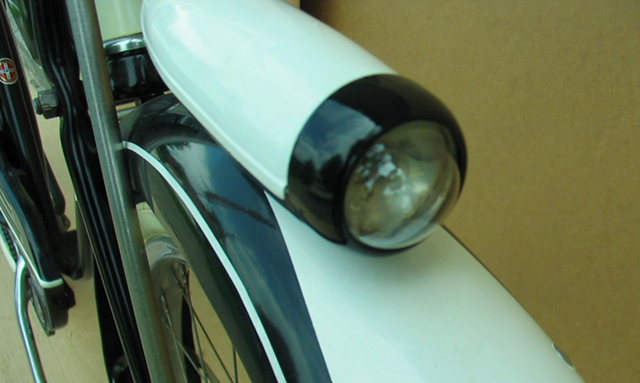
New Toy: Vintage Schwinn ‘57 Wasp 26” Balloon Tire Bicycle

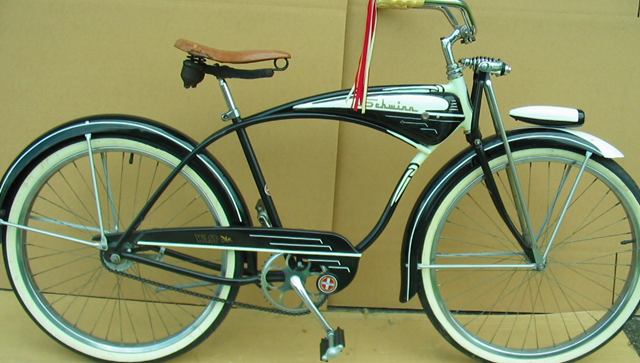
I recently purchased a 1957 Schwinn Wasp that I hope to ride in Redmond’s Derby Daze parade next month. Anyone else riding vintage bikes on that day let me know and we’ll hook up. The bike has nice S-2 rims, the chrome is in fair condition, and the paint is excellent. Actually the bike is way too pretty to be all original, don’t you think?

image

I started to research more about this Schwinn Cruiser at the Schwinn Forums. The advent of the Internet has opened up the vintage bicycle hobby to more people and finding parts and bikes is very easy. But the popularity driven by Baby Boomers has made this a fairly expensive hobby now-a-days. Don’t get me wrong there are still great deals out there but they are getting harder to find.

image image

image image

I purchased a Schwinn Phantom back rack with light assembly to add to this bike. I also am considering a two-speed kick back hub to replace the single speed one on the bike. I have seen some folks put a nice 7-speed hub on their vintage bikes, but I’m loath to do that to this bike that so far as I can tell has all vintage parts on it.

As I researched this bike on the Internet, I have found many vintage Schwinn Wasp bikes but none that looks like this one. Ah, I’se luvs a mystery.

Posted in Bicycles, Health and wellness, Hobbies, Lifestyle, Vintage | Tagged , , | 11 Comments

Response to email asking “How do I get in a band?”

So you want to return to music performance. And it’s been a lot of years since you last picked up the instrument, maybe even as long as high school or college. I was there once and here are some tips and tricks I have learned along the way. Be aware that as the baby boomers find themselves in an empty nest or retired position they are going to return to doing the things they loved in school. Trust me, it won’t be tackle football either. So there will continue to be a lot of competition in all levels of music organization.

MJBshazNgreg2009The groups I play with in the Redmond (Eastside part of Seattle) have *long* sub lists can be both frustrating at first blush and interesting as to the possibilities. The number of people wanting to join got so big a couple of years ago that we had to institute an audition process. But all is not lost. Consider these options and from a hobbyist like me who mans the 2nd alto and tenor chairs mostly:

1. The complete list of Community bands in the US and around here is at http://www.community-music.info/. I search on the string ‘WA’ and then work my way through the list. With over 1100 community bands listed, that’s the most efficient way I know to search. I know that Monroe and Shoreline were looking for clarinets and saxes last year. I joined the community band to start networking with other hobbyist musicians. Concert band isn’t my thang, but it catapulted me into jazz in a big way as I met other like-minded folk.

2. Create your own sax quartet. I did this and now have ~12 people who rotate in during the year. Last year we actually gigged three times. Here is one of the videos: http://www.youtube.com/watch?v=udy4n8ggWys. Yes that’s me on the soprano. All I had to do was procure the music and start pokin’ around for sax players in my part of town. I actually converted my wife into a sax player from her primary instrument of clarinet. My collection of sax quartet charts is now over 100 arrangements.

3. Create your own Big Band. I did this a number of times and now run the Microsoft Jazz Band at work performing 4 times a year. For the really rookie player, I helped create the Pacific Cascade Big Band performing at swing dances monthly. These groups have the longest sub list of anything I do. And my personal library of jazz charts is over 1000. The nicest part of doing this is that no one else wants to do it. So you can get a lot of stellar musicians who participate because you make it easy for them. And I get to select the music I luv to play.

MJBsaxGuyz

4. Start playing to Aebersold Jazz play-along books if you aren’t already. Great for developing those solo chops. If you’ve never done this start with the ‘Maiden Voyage’. That’s where a lot of beginners start. And if you have a nerves thang and never plan to play in public, you can get the full combo experience in the safety of your home. If you luv to perform publicly you can hone your solo skills, get ideas for great licks, and have fun too.

5. Open mics are around town like at Crossroads of Bellevue in this part of town. I don’t do this kind of thang because I prefer to play an hour or more of music to playing one song a night.

6. Just start taking lessons and see if your instructor can hook you up with playing opportunities. I thought I was a *great* player until I started taking lessons. Now I’m fixing many of the things that I hated to hear in my recorded solos. A great teacher can take almost any mediocre player and turn them into someone who is interesting to listen to.

7. Use decent equipment: please don’t bring an instrument to any practice or gig that you can’t even tune. (Yes, I know people who do this, usually in a community band setting. If your instrument hasn’t been touched in years by a technician, here’s betting it has leaks. For example if you can’t play the low end of the instrument (for sax think in the pinkie key range) you probably have a leak in the upper stack. No, that is not intuitive to figure out. And if your low note warble, most likely your mouthpiece isn’t right for you. A good tech can make your instrument the best it can be just like a good teacher can help you sound the best you are capable of playing.

It may take you some time to get into the network of fellow musicians interested in the kind of music you prefer. But I believe it’s more about the journey to where you want to be than getting there. Along my trip I’ve started up jazz combo like the Dissonance that gigged about 8 times a year. After three years I gave up on it even though we were getting gigs. I am sooo an intermediate player, but there are a lot of us out there. And if you have organizational and networking skills like I do, it can be easier.

BTW, I’m taking two lessons a week and have for the last three years or so. I started playing after a 25 year hiatus and found out that I probably never was a very good player even though I played first chair throughout high school. Start with the Community band list (item 1 above) to find a community band in your part of town and work it from there.

Posted in Music | Leave a comment

My Dawg wrote this…

image

Well, maybe I should have said my dawg *could* have written this if she knew how to write. It’s actually from Hyperbole and a Half.

Posted in Humor | Leave a comment

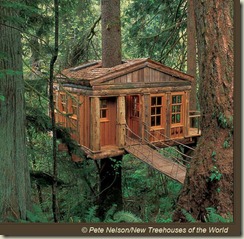
11 Amazing Tree Houses

TreeHouseTemple of the Blue Moon, Fall City, Wash.

“Pete Nelson is a rare triple threat: a writer, a photographer and a treehouse builder. Nelson is also an architect and a contractor, as well as a family man, and he has spearheaded a growing treehouse revival that inspires the kid in all of us. Nelson’s latest book, "New Treehouses of the World," takes us on a fantastical voyage through secret hideouts and dream forts, from Long Island, N.Y., to Thailand and many places in between.”

Read and see more…

Posted in Travel | 1 Comment

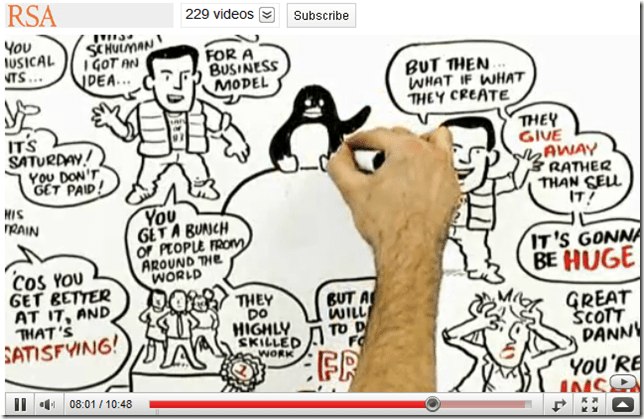
Drive: The surprising truth about motivation

This lively RSA Animate, adapted from Dan Pink’s talk at the RSA, illustrates the hidden truths behind what really motivates us at home and in the workplace. www.theRSA.org

image

Fascinating talk a number of levels. I shared this with my peeps at work and wanted to do the same for my friends and family who read this blog.

Posted in Everyday Science | 1 Comment